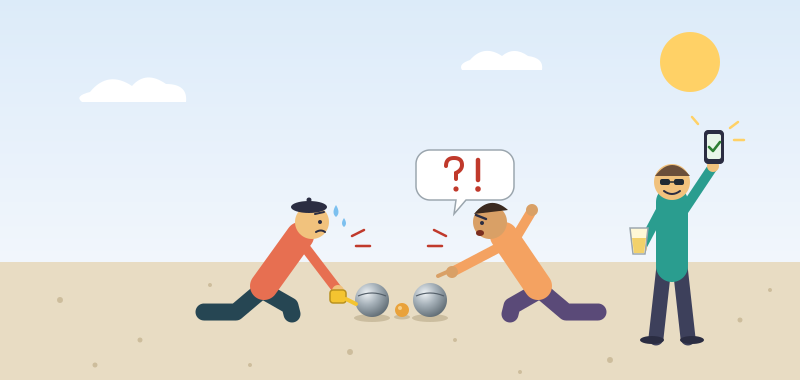
Anyone who has played pétanque knows the moment. Two boules look equally close to the cochonnet, nobody brought a measuring tape, and the game stops while someone fetches one and kneels in the gravel. In French: il y a mesure.
I built a small app to settle it from the phone already in your pocket. You take one photo, tap the cochonnet and the boules, and it tells you who has the point. It is free, needs no account and no install, and it went public today:
- App: https://petanque-metre.com
- Source (MIT): https://codeberg.org/osiris/petanque-metre
I come from a DevOps and .NET background, so this was a good excuse to ship a whole product end to end, with the front end this time.
Why a web page and not an app store app
The people who need this are on a court with friends, not in an app store. A link in a group chat works for everyone, on any phone, with nothing to approve or update by hand.
So it is a PWA: a static web app. Open the link and play, or add it to your home screen if you like. Once it has loaded it keeps working with no network, which matters because courts are not known for good signal. The camera API needs HTTPS, which is one more reason to ship it as a normal site.
The stack is TypeScript, built with Vite and vite-plugin-pwa, with no runtime dependencies. Everything needed at the court ships in the page. Tests use Vitest and Playwright, linting uses Biome, and Node is on 24 LTS.
How a photo becomes a distance
The core idea is that a boule is a ruler.
A boule’s diameter is known (about 74 mm) and so is the cochonnet’s (30 mm). A sphere looks like a circle from every angle, so its size in pixels tells you what one pixel is worth in millimetres. No reference card, no depth sensor, no calibration step.
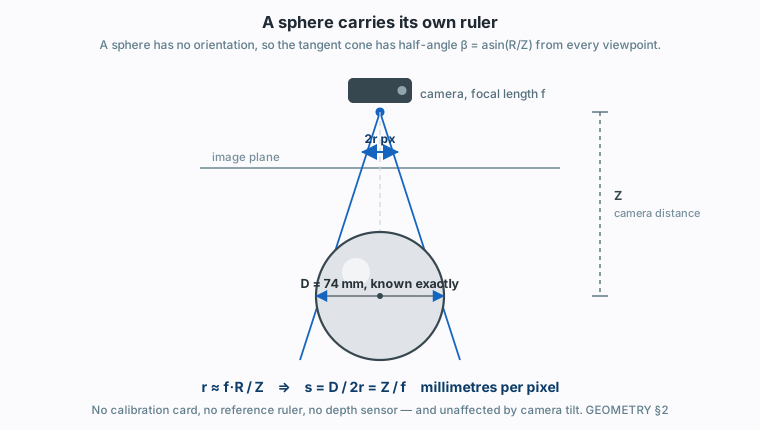
A sphere carries its own ruler: its apparent size depends only on its distance, never on the viewing angle.
From there:
- Measure the pixel distance between the two centres.
- Convert it to millimetres using the scale from the spheres.
- Subtract the two known radii, and you have the gap.
That is the easy part. The rest is a long list of small ways it goes wrong, and none of them crash. Each one returns a plausible, wrong number. Two examples from the geometry notes:
- Height. A boule’s centre sits about 22 mm higher off the ground than the cochonnet’s. Shoot from off to one side and part of that vertical offset leans into the image and reads as horizontal distance. The fix is not a tolerance but a null: hold the phone directly above the cochonnet and the error is zero.
- The rules measure a sloped line. Because of that same height difference, the shortest distance between the two surfaces is not horizontal. The app measures that true distance. A tape laid on the ground reads short, by up to about 4 mm, on exactly the close calls.
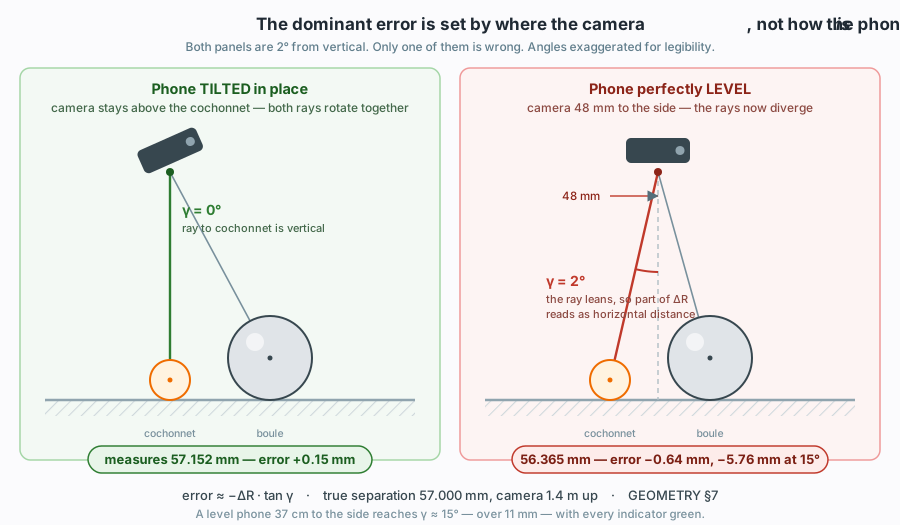
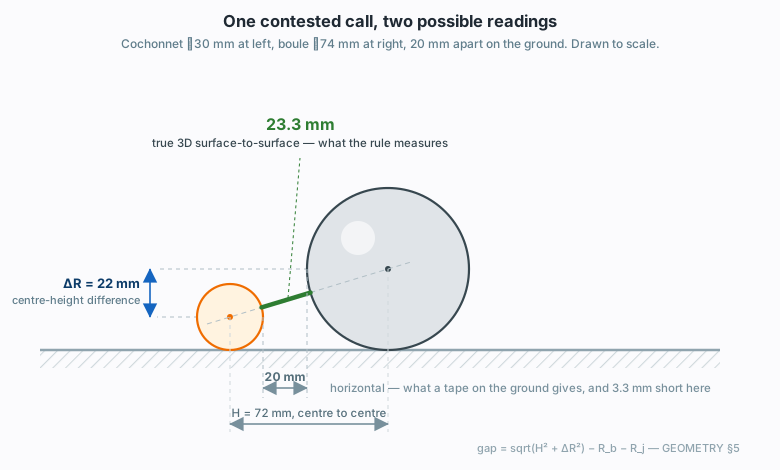
When the photo cannot decide, the app says too close instead of guessing. If it names a winner, it means it. Today it is deliberately cautious: it calls a winner when the boules differ by roughly 25 mm (boules about 10 cm from the cochonnet) to 60 mm (about 30 cm away). The goal is to separate boules less than 5 mm apart, but that is a target, not a promise, and each step towards it has to be measured on a real court before it ships. A second photo from the opposite side is already supported, because it cancels the main error, the viewing angle.
The full maths, with drawings, is in docs/GEOMETRY.md in the repo.
The bug that flipped every Android phone
The app reads the phone’s accelerometer to know how level it is held. On a real iPhone I noticed the tilt guidance never worked. Lying flat, screen up, the gravity reading on the z axis was about -9.6. The Android phone I tested with gave +9.6 for the same pose, which is the W3C convention. iOS WebKit reports the gravity vector with the opposite sign.
My code rejected any reading where the z component was too small a fraction of gravity, so on every iPhone the check failed and the tilt feature silently switched off. The numbers themselves survived the negation. Only the guard rejected them.
My first fix keyed the sign flip off DeviceMotionEvent.requestPermission, which only exists on iOS. Except it does not only exist on iOS. Chrome on Android has it too. With that change the Android phone’s readings came out negated instead: flat, screen up, z read -9.8.
The second fix detects WebKit by a property that differs between the two platforms. I probed both phones before choosing it:
"webkitCompassHeading" in DeviceOrientationEvent.prototypewas true on the iPhone and false on the Pixel.
I then verified the fix live on both: the sign came out -1 on the iPhone and +1 on the Pixel.
The lesson is that a platform predicate has to be measured on each platform before it ships. Reading the code and the spec did not catch it. Testing on both phones did.
Keeping it small, and keeping it honest
The build has a hard size ceiling: 100 KB gzipped over dist/, source maps excluded. It is not a transfer-time target. It exists to catch something large arriving by accident, such as pulling in a full computer vision library. npm test enforces it, so a regression fails the build rather than waiting for someone to notice.
Testing is built around one rule from the project’s testing doc: “it runs and shows a number” is never evidence. No bug in this project throws. A rotated photo, a mismatched coordinate space or a wrong boule diameter all yield a measurement that looks reasonable and is wrong by more than the thing being measured. So:
- A check that has never failed is not a check. Before trusting a new test, I break the thing it guards and watch it go red.
- Unit tests prove algebra, not accuracy. When a change touches measurement, the fixture harness numbers decide, and the commit message quotes them before and after.
- Vitest covers the pure logic: geometry, uncertainty, ranking, parsing, state. It also holds repo-wide rules that no linter reads, such as CSS, byte budgets and manifests.
- Playwright runs against a production build, never the dev server, and currently has 18 spec files covering camera permission, offline reload, language switching, marker dragging and a full pipeline run on a real photo with a committed answer. It needs the full Chromium rather than the headless shell, because the headless shell has no media stack and the camera flow fails for reasons unrelated to the app.
What automation cannot reach, such as real cameras and real sensors, I test by hand on phones, with a written checklist. The gravity bug above came from exactly that.
Privacy
Everything runs on your phone. There is no account, no advertising and no tracking scripts. The app never saves or sends your photos, except through an optional data collection that is hidden and off by default. It is offered only on my own test phones, and it exists to gather labelled photos for a future automatic ball detector. Anything it kept can be deleted at any time.
The site is static. The only thing seen on a normal visit is the visit itself (address, browser, phone model, country) and the browser’s check for a new version. Updates take effect when you tap Update now or at the next opening, never in the middle of a measurement.
It is also an aid, not an umpire. An official measurement still decides.
Try it
Open https://petanque-metre.com on your phone, hold it above the cochonnet and take a photo. If you want to read how it works or help, the source is at https://codeberg.org/osiris/petanque-metre under the MIT license. The next steps are measuring the real error on a court so the margin can tighten, and eventually finding the balls automatically so you do not have to tap them.